Getting Started
🎮 Live Demo
Before diving in, check out the TaskFlow demo app to see react-auth-gate in action:
The demo is a complete task management application showcasing all features of react-auth-gate.
Installation
npm install react-auth-gate
Your First Permission Check
1. Define Your Rules
Create a rules object that defines your permission logic:
import { PermissionRulesMap } from 'react-auth-gate';

const rules: PermissionRulesMap = {
  // Simple role check
  'admin.access': ({ roles }) => roles.includes('admin'),

  // Resource-based check
  'post.edit': ({ user, resource }) => {
    if (roles.includes('admin')) return true;
    return resource.authorId === user.id;
  },

  // Async check
  'feature.premium': async ({ user }) => {
    const subscription = await checkSubscription(user.id);
    return subscription.tier === 'premium';
  },
};
2. Wrap Your App
Use PermissionsRoot to provide permissions to your app:
import { PermissionsRoot } from 'react-auth-gate';

function App() {
  const currentUser = { id: '1', name: 'Alice' };
  const userRoles = ['editor', 'user'];

  return (
    <PermissionsRoot
      user={currentUser}
      roles={userRoles}
      rules={rules}
    >
      <YourApp />
    </PermissionsRoot>
  );
}
3. Use Permission Checks
With Components
import { PermissionsGate } from 'react-auth-gate';

function PostActions({ post }) {
  return (
    <div>
      <PermissionsGate allow="post.edit" resource={post}>
        <button>Edit</button>
      </PermissionsGate>

      <PermissionsGate allow="post.delete" resource={post}>
        <button>Delete</button>
      </PermissionsGate>
    </div>
  );
}
With Hooks
import { usePermission } from 'react-auth-gate';

function EditButton({ post }) {
  const { allowed, loading } = usePermission('post.edit', post);

  if (loading) return <Spinner />;

  return (
    <button disabled={!allowed}>
      Edit Post
    </button>
  );
}
Advanced Features
Multiple Permission Checks
Check if ANY or ALL permissions are allowed:
// ANY (OR logic)
<PermissionsGate allow={['admin.access', 'moderator.access']} mode="any">
  <ModTools />
</PermissionsGate>

// ALL (AND logic)
<PermissionsGate allow={['user.verified', 'feature.premium']} mode="all">
  <PremiumContent />
</PermissionsGate>
Feature Flags
<PermissionsRoot
  user={user}
  roles={roles}
  rules={rules}
  flags=
>
  <App />
</PermissionsRoot>

// Check feature flag
<PermissionsGate allow="flag:newUI">
  <NewDashboard />
</PermissionsGate>
Fallback UI
<PermissionsGate
  allow="admin.access"
  fallback={<p>Access Denied</p>}
>
  <AdminPanel />
</PermissionsGate>
Disable Elements
<PermissionsGate allow="post.edit" resource={post} disable>
  <button>Edit</button>
</PermissionsGate>
Dev Tools
The dev panel is automatically enabled in development mode. It allows you to:
- View all permission checks in real-time
- Override roles, permissions, and feature flags
- Debug authorization logic
- See evaluation history
Press the floating button in the bottom-right corner to open it!
Preview
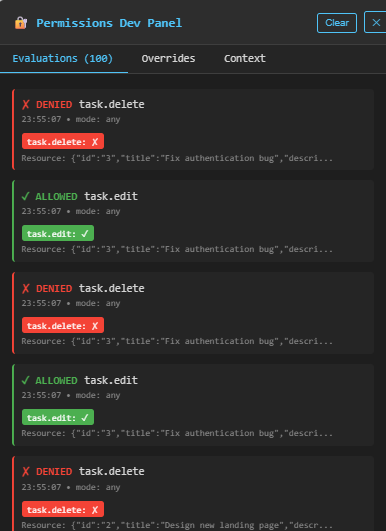
The dev panel has three tabs:
- Evaluations - Real-time permission checks
- Overrides - Test different roles/permissions
- Context - Current user and configuration
| ← Back to Home | API Reference → |