React Auth Gate
A production-grade React authorization framework that centralizes RBAC, PBAC, ABAC, feature flags, and async permission checks into a clean, declarative API.


✨ Features
- 🎯 Declarative Permission Checks - Use components and hooks for clean, readable code
- 🔐 Multiple Access Control Models - RBAC, PBAC, ABAC all in one library
- 🚀 Async Rule Support - Check permissions against databases or APIs
- 🎛️ Feature Flags - Toggle UI features dynamically
- 🛠️ Dev Panel - Debug and override permissions in development
- ⚡ Tree-shakeable - Only bundle what you use
- 📦 TypeScript First - Fully typed with excellent IntelliSense
- 🎨 Framework Agnostic - Works with any React setup
🎮 Live Demo
Check out TaskFlow - A full-featured task management app built with react-auth-gate:
The demo showcases:
- Role-based access (Admin, Manager, Member)
- Resource-based permissions
- Full CRUD operations with permission gates
- Statistics dashboard with role restrictions
- Real-time dev tools for debugging
🚀 Quick Start
Installation
npm install react-auth-gate
Basic Usage
import { PermissionsRoot, PermissionsGate, usePermission } from 'react-auth-gate';

const rules = {
  'admin.access': ({ roles }) => roles.includes('admin'),
  'post.edit': ({ user, resource }) => resource.authorId === user.id,
};

function App() {
  return (
    <PermissionsRoot user={currentUser} roles={['editor']} rules={rules}>
      <PermissionsGate allow="admin.access">
        <AdminPanel />
      </PermissionsGate>

      <PermissionsGate allow="post.edit" resource={post}>
        <EditButton />
      </PermissionsGate>
    </PermissionsRoot>
  );
}
📚 Core Components
<PermissionsRoot>
Wrapper provider that automatically integrates dev tools in development.
<PermissionsRoot
  user={currentUser}
  roles={['admin', 'editor']}
  permissions={['post.edit', 'post.delete']}
  rules={customRules}
  flags=
>
  <App />
</PermissionsRoot>
<PermissionsGate>
Conditional rendering based on permissions.
<PermissionsGate
  allow="post.edit"
  resource={post}
  fallback={<DisabledButton />}
>
  <EditButton />
</PermissionsGate>
usePermission() Hook
Programmatic permission checks.
const { allowed, loading } = usePermission('post.edit', post);

if (loading) return <Spinner />;

return (
  <button disabled={!allowed}>
    Edit Post
  </button>
);
🎛️ Dev Tools Panel
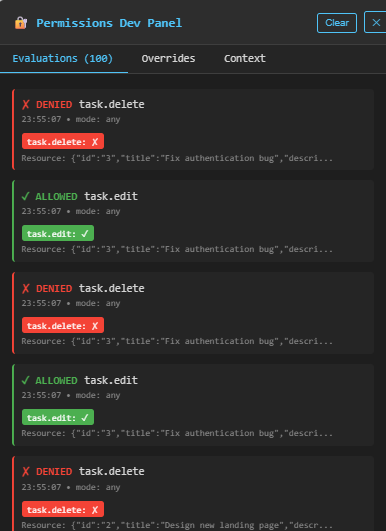
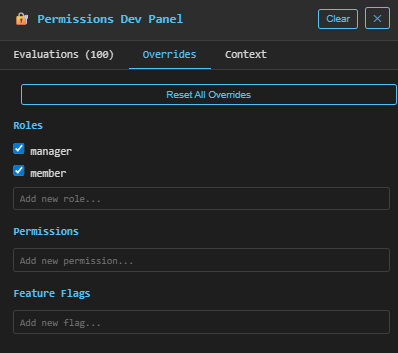
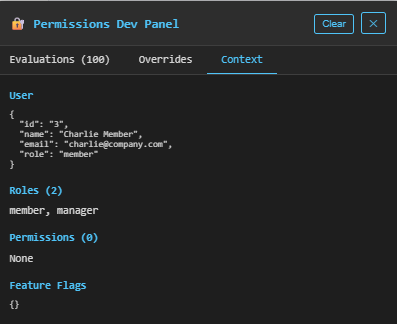
The built-in dev panel lets you:
- 🔍 View all permission checks in real-time
- ✏️ Override roles, permissions, and flags
- 🐛 Debug authorization logic
- 📊 Track evaluation history
Automatically enabled in development mode!
Screenshots
Evaluations Tab - See all permission checks in real-time:
Overrides Tab - Override roles, permissions, and feature flags:
Context Tab - View current user context:
📖 Documentation
🔗 Links
📝 License
MIT © Klejdi 2K